How to prepare your images.
Everything in a space comes from the files you give the builder. The preparatory work starts by organizing your images in folders. Every folder will become a different room. This guide covers which formats work, what size to export, what happens to your files when you publish, and how your names are used.
Most of it applies whether you host the gallery yourself or publish it here. Only the publishing limits are ours.
Formats
The builder accepts three image formats. The same three apply everywhere: in the builder, in a gallery you save and host yourself, and when you publish.
- JPEG
- Photographs and scans. The safe default. Named .jpg or .jpeg.
- PNG
- Flat colour, line work and screenshots. Named .png.
- WebP
- Works anywhere JPEG does, at a smaller file size. Named .webp.
- Everything else
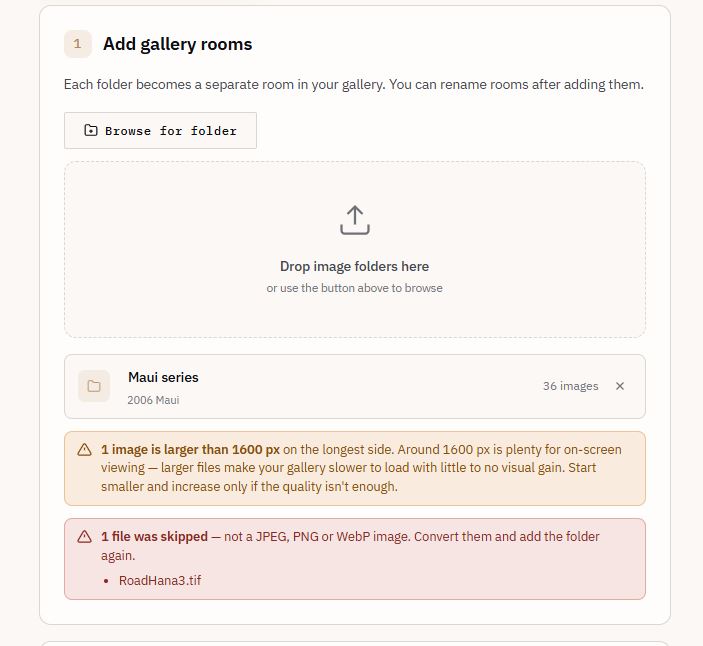
- HEIC, TIFF, RAW, AVIF, GIF and SVG are not accepted. Convert them first.
Files are identified by their content, not by their extension. Renaming a HEIC
file to .jpg does not make it work. Rejected files are listed by name, so you
can see which ones to convert.
Other files in your folders, such as README.txt or .DS_Store, are ignored.
How big to export
Export at around 1200 px on the longest side. Each image in a gallery is loaded as a texture in 3D, so larger files take longer to load and use more memory. Past about 1200 px, a visitor sees little extra detail on screen.
The maximum file size is 25 MB, and the maximum resolution 8,000 px on the longest side. In practice your storage limit — 2 GB on Artist, 10 GB on Studio — is what caps how much you can upload.
There is no limit on the number of images in a folder, but it is worth staying below 100 to 150. Past that, split them across several folders.
Rooms come in different sizes. The builder picks the smallest room that fits all the images in a folder. If the largest available room is still not enough, it creates extra rooms and connects them to the first one with a door.
- 1200 px
- Recommended longest side, height or width.
- 1600 px
- The builder warns you about any image larger than this. Larger images are still allowed.
Images are never resized on upload. A 3000 px file is stored at 3000 px, counts against your storage at 3000 px, and is downloaded by every visitor at that size. The only image resized for you is the gallery thumbnail, at 600 px.
What publishing does to your files (Only if you host in OpenVGal website)
When you publish, each image is decoded and saved again in the same format. Two things change.
- Rotation is applied. If a photo carries an EXIF orientation tag, the rotation is written into the image itself, so it appears upright everywhere.
- Metadata is removed. EXIF, XMP and IPTC are stripped. That includes camera settings, GPS coordinates, and any author or copyright fields.
This happens to images in a draft saved from the builder and to images added to a gallery later.
If you need attribution to be visible, put it in the artwork title and subtitle, or into the image itself.
A published image is not an exact copy of the file you uploaded. Keep your originals.
File and folder names
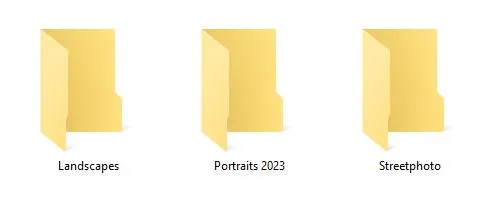
The builder uses your folder and file names as they are.
- A folder name becomes the room name. It is shown in the room, listed in the Gallery Map, and used in the link that opens that room directly.
- A file name without its extension becomes the artwork title. It is shown when a visitor clicks the piece, and on the plaque if plaques are on.
So Portrait_BW.jpg becomes the title Portrait_BW.
You can rename rooms in the builder before building, and edit titles and subtitles in Customize afterwards.
A number at the start of a file name, such as 001_dusk.jpg, sets the order
images are placed in and is left out of the title.
Sequencing shows how to use it to choose where each piece
hangs.
Plaques are off by default. With plaques off, the title is still shown when a visitor clicks a piece. The navigation guide covers both.
Before you build
- Export as JPEG, PNG or WebP, at around 1200 px on the longest side.
- Name your files and folders the way you want them read.
- Use one folder per room. Eight to twelve images is a comfortable size.
- Crop images to the shape you want. The builder does not crop.
- Keep your original files.
Hanging size, room style and layout are set after the build, in Customize — customizing a space has all of it.
Open the builder